Not ham radio related, but.. radio related.
My(Christine’s) car a Toyota Prado wouldn’t open the other day with the beepy thing! Try as I did, it wouldn’t open!.Stand on one leg, point at the sky, walk around and around and around the car pushing the open button like a ninja, nothing.
Finally, after lots of button pushing the happy beeps of road pleasure let me into the big metal box, the plight of a car with a smart key. The manual says, once inside the car, if you hold a flat smart key against the push start button, it will register the key and start the car, and this did work, good to know.


I had seen discussion of lost smart keys and a $400+ Toyota tax to replace and was worried the key and battery were all sealed in an expensive package that would need a dealer to replace and reporgram.
A read of the car manual (i know – who reads manuals) and a quick google on the kay and battery replacement didn’t really find anything. The manual said, any issues with your remote/smart key, take it to a dealer.
So I set about the key with a screw driver and prised it open. To discover inside was a CR1632 3v button battery and it was easy to replace it myself.

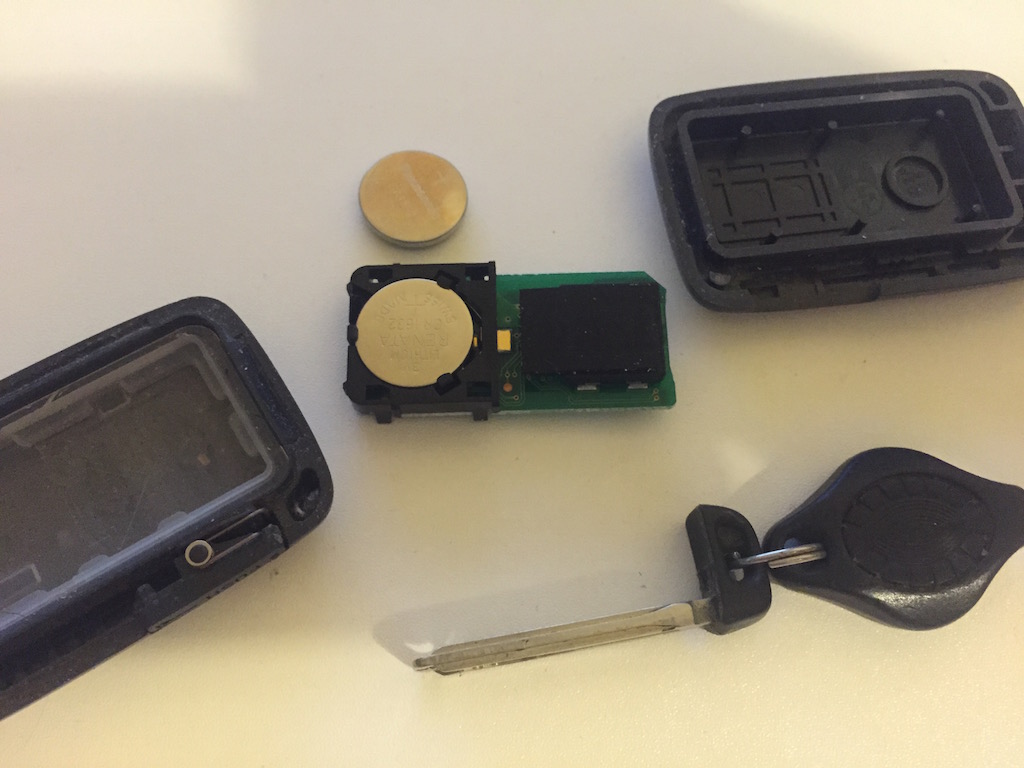
A new CR1632 was purchased and installed. My next concern was, did the key forget its program without power and did it still need a dealer to reprogram the key, but, it still works. With a new battery i am back to a wireless car with smart start! So, search engines, find this and let others know its EASY to replace the Battery in a Denso 14ACX CCAB08LP0730T4 smart Key for Toyotas.


You don’t need to use a screwdriver.
Pop out the metal key and it’s end fits into the slot on the end of the smart key. Twist and it’s open.
thanks 😀
you got the wrong battery. its suppose to use cr2032
nope, the battery that came out of my old one was what went back in…
Lifesaver, weirdly both of my keys went flat at the same time but a pack of batteries and they are both back in business! Could be the original batteries when my car was new (2016 Prado 150 diesel manual, 228000km). Thank you!